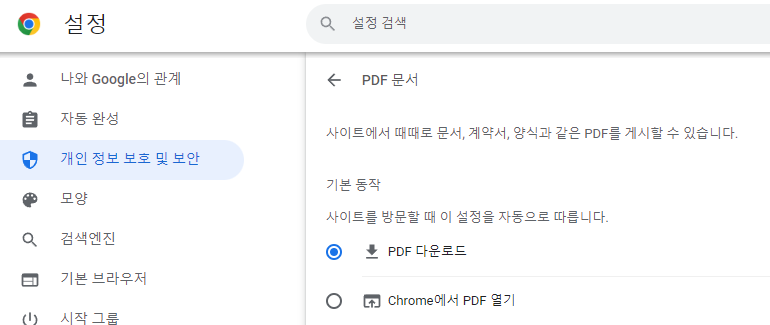
크롬 PDF 내장뷰어 비활성화 Post author:parkgarden Post published:2023년 01월 31일 Post category:Computer Tip Post comments:0 Comments 크롬을 이용중에 PDF 파일을 다운로드 하기 위한 옵션 설정 방법 크롬이용시 PDF 파일을 다운이 아닌 자체 내장 뷰어로 열때가 있다. 이런 문제를 해결하는 방법이다. 크롬 주소창에서 아래의 URL을 복사해서 붙여넣기(대소문자구분필요) chrome://settings/content/pdfDocuments Chrome 설정 창 PDF 다운로드로 변경 Please Share This Share this content Opens in a new window Opens in a new window Opens in a new window Opens in a new window Opens in a new window Opens in a new window Opens in a new window Opens in a new window Opens in a new window Opens in a new window Opens in a new window You Might Also Like 윈도우 CPU 점유율이 높을때 해결방법 2023년 01월 30일 시놀로지 도커 트랜스미션 VPN 설정 2023년 02월 01일 엑셀에서 이름 충돌 해결방법 2023년 01월 31일 답글 남기기 응답 취소CommentEnter your name or username to comment Enter your email address to comment Enter your website URL (optional) 다음 번 댓글 작성을 위해 이 브라우저에 이름, 이메일, 그리고 웹사이트를 저장합니다.